Monday, 22 August 2011

How Social Media improves your SEO...

  • Want to learn how social media improves your position in the search engines?
  • Want to know why social media is relevant to improving your business sales pipeline?
  • Looking for the missing piece in your social media strategy?
Why bother with Social Media?
In under 7 minutes this video answers this fundamental social media question using simple language and diagrams.


Some of the key points:
  • Locate the specific networks that you need to be involved in
  • Listen to what their needs are, what questions are they asking?
  • Answer those questions through the content you produce
  • Find your content "Evangelists" or communicators who will shout about your content
  • Build your community who are interested in your message
  • Choose the right community for you
Want to learn how to engage and convert your website visitors into brilliant customers?


We will give you the right advice, tools and focus to attract more people to your website on a small budget.
Our Social Media Workshops are available in Worcester & Bromsgrove, to find out more please visit our website.

Friday, 12 August 2011

Choosing the right keywords for you

On Page Search Engine Optimisation
If you have been looking into improving your natural position in the Google search results (or any other search engines results) you'll probably know that the first step is improving your page content and one of the easiest ways to do this is by including the keywords that people use to search for your products/services, into the content of your web pages. My previous blog explains the two main types of Search Engine Optimisation (SEO), and improving your page content is the first, easiest step to take.

Beating the Competition
What we look at in this blog is after you've got your list of keywords, what's the next step?
Most of us don't have a completely unique product or service, there will be other people who offer the same or similar products/services that we do, and therefore use the same keywords (competition). It could also be the case that your competitors seem to rank higher than you in the search results, even though you think you may be including all the top, most popular search terms in your content.

Finding your Niche keywords or phrases
This article shows you how to use the "Google Keywords Tool" to find possible niche keywords and phrases that you could use, to improve your Google ranking. It is vital that you do offer the products and services and don't just include them in your page text (if you did this people would arrive at you page expecting to find a product, discover you don't offer it and quickly leave your page resulting in a "bounce"). Bounces form part of the algorithm that lowers your position in search engine results. The three things we will be trying to achieve in this order are relevancy, least competition and then search popularity.

How do we find the best/right keywords for us?
After carrying out your initial exercise to think of all your relevant keywords, you should have a list of around 20 - 25 keywords or phrases for each product/service that you offer. When you use the Keywords Tool - you enter keywords and phrases relevant to one product at a time.

Using the Google Keywords Tool
First of all search for the "Google Keywords Tool" using Google search.
  1. Type in all your keywords and phrases - one per line
  2. Tick the box - "Only show ideas closely related to my search terms
  3. Open - Advanced Filters and Options
  4. Choose you target audience location and main language
  5. Don't include adult ideas - unless you're in the sex industry
  6. Show ideas and statistics for - Most of the time how will they be searching? From their desk on a laptop or from a mobile?
  7. Filter Keywords:
    Local Monthly Searches
    Here you want a decent online audience size, this is relative to your product/service. E.g. Here I have stated that I want at least 1000 local searches/month.
    Competition
    To find out what the niche search terms and phrases are for your business – you want to choose “Low” competition.
    Global Monthly Searches
    If you wanted to target foreign markets you could choose this to be high and local to be low. E.g. Here I have stated that I want at least 5000 local searches/month.

Discovering the most effective keywords for your business and to maximise your online transactions is an exercise that needs to be done over a period of time. The best thing to do is choose your list, check you results each month and see which terms results in the best traffic/conversions for your business.

If you would like to learn more about Search Engine Optimisation and improving your own online marketing strategy we are offering Monthly Inventive Workshops in Worcester and Bromsgrove - Prices start from just £25 per taster session - Book your place today.

Thursday, 11 August 2011

What is SEO or "What is Search Engine Optimisation"?

Definition of SEO
Search Engine Optimisation simply means improving your website so that it appears high in the organic (not paid for) search engine results.

The most popular search engines are Google, Yahoo and Bing and good (best practice) search engine optimisation techniques are pretty similar across all three.

There are two main types of SEO, on-page and off-page. Generally on-page relates to having high quality, relevant content that meets the needs of your searchers (or the search queries that your target audience types) and is content generated by you or your company and therefore within your control. Off-page optimisation generally relates to links to your website made by you or preferably other people and therefore not in your control.

On-Page Optimisation
Search engines are so quick and effective, because we want people to find our information when they search for our products and services. So when they search for our products and services we try to meet that search criteria by including those "keywords" they are searching for in the content of our pages. Moreover, if someone (or our potential customer) asks us a question, we try our best to answer that question.

Search engines reward websites that are relevant by ranking their web pages higher in the search results. This ensures that the search engine is working effectively.

The algorithm (mathematical equation) that search engines have developed (and improve and change all the time) only have one aim in mind - to deliver relevant, high quality results for the searches that people enter. If you try and gain a foothold in the rankings that you don't deserve, the search engines will find you out and punish you, they can do this by excluding your website from their search results altogether. Concentrate on improving the information you provide to your customers and you'll be rewarded over time by high rankings. If you include keywords just to get people to your page and then the content is poor - people will quickly leave that page - this is a "bounce" get a high "bounce rate" and this will send you down the search engine rankings.

Off-Page Optimisation
While we can control some of our inbound links, the majority and the ones that search engines favour are links made by other people. This is a way of letting the search engines know that it's not just the person who owns the company that verifies this website has good, relevant content about the products and services it offers but that it had been recommended by a third party.

By getting more inbound links from other people, this improves the authority of your website. The longer your website has been established and the more inbound links that it has the higher it is likely to rank.

Where do I start?
If you are just beginning to learn how to improve your web ranking, start by thinking about what products and services you offer and who will be searching for these. Assuming your target audience are likely to search for your products online, next think about creating a list of keywords (words or phrases that people use to search for your products and services).

No two people search for things in the same way (or using the same words and phrases), so next ask all of your colleagues to do the same so that you have a comprehensive list. now you're ready to optimise your keywords - which is the next Coldicott Freelance Training SEO Blog - sign up and receive the next Blog in your inbox.

In the picture we can see an example of a keyword list for "Handmade Chocolates".

Search Engine Optimisation Taster Workshop?
If you would like to learn more about, website optimisation or search engine optimisation for your website - you might like to attend our Search Engine Optimisation Taster Workshop.

Monday, 25 July 2011

How to Schedule in Bulk using Hootsuite

One of the most common excuses I hear from people for not using Social Media is that they don’t have enough time. Social Media Management Tools like Hootsuite enable you to manage your time better by scheduling a load of updates in one go. This can be particularly effective for social media marketers who are scheduling their tweets around specific marketing campaigns.

Scheduling in Bulk...

1. Log into Hootsuite

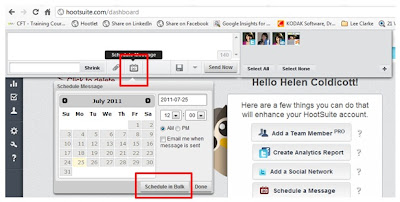
2. Click into the top left-hand corner, like you are about to write an update.

3. Select the ‘Schedule’ button, followed by the ‘Schedule in Bulk’ button as above…

4. This will open a new window, ‘Bulk Schedule Updates’. Select ‘Download Sample.csv and open this in Excel. You'll see three columns, Column A is for the date and time (follow their format), Column B is for your update/tweet and Column C is for your URL.
You can schedule up to 200 messages at a time but you can’t schedule the same message twice.
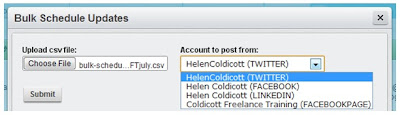
Once you’ve written your updates, save the CSV file and then you are ready to upload them to Hootsuite. Simply choose your file and then choose which account the updates are for.

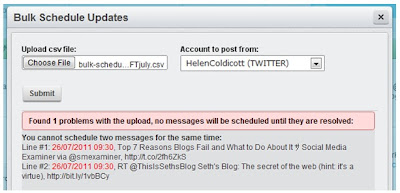
If you make a mistake – Hootsuite will let you know and
not upload your updates until you have corrected the problem in the excel spread-sheet, saved it and then choose it again.

For example, the problem with this upload is that 2 tweets have been scheduled for the same time…

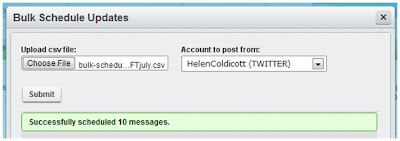
When you have uploaded your updates successfully Hootsuite will let you know, see left…


Here's a run through of the Hootsuite rules for Scheduling Updates in Bulk:
• - Format: DD/MM/YYYY HH:MM,"MESSAGE","URL"
• - All dates/times are relative to currently selected time zone
• - URLs must contain "http://"

Example message: 16/11/2010 17:35,"Your message here","http://website.com"

• - Schedule messages at least 10 minutes from upload time
• - Assign times in 5 minute increments
• - Only one messages per time slot
• - Duplicate messages are not allowed

If you are interested in learning more about social media marketing and would like to attend a workshop, have one to one training or discuss other options please call Helen on 01905 23902.

Wednesday, 13 July 2011

How do I build my social media strategy?

In short like you would build any other marketing strategy.

1. Why am I doing this in the first place?
First you need to establish what it is that you want. Would you like more leads into your website, to expand your audience on Twitter or Facebook, build a network of local business prospects or publicise an upcoming event?

2. Who are my target audience?
Once you’ve clarified what it is that you’re trying to achieve, the next question is who is my target audience and where do they hang out? So if you are a local arts and crafts company looking for direct customers and some local resellers, you need to decide what type of social media they use. Probably Facebook and Twitter will be most popular for the consumers and to target specific resellers, LinkedIn and local business retail groups.

If you are a company who only deals with large construction firms and project management companies, you need to think what type of social media might they use and where do they hang out. Mostly LinkedIn also easy to target specific companies and individuals and maybe Twitter.

3. What resources do I have?
Once you’ve decided what it is you want and who you wish to target, you might ask yourself how much time and money do I have to spend. If you have a limited budget you might decide to only use free social media sites that you can manage internally. If you have a little more money you might want to decide whether it would be best to get some help and outsource some of the responsibility. Set yourself a time limit so that you can measure the effect of your campaign.

4. What’s my plan?
Planning is vital. It is all too easy to start using social media tools without a proper plan or strategy and then wonder where your time went and why you have very little to show for all your effort. If you create a schedule, delegate some of the time it takes to the people best suited to using the different social media tools available.

5. How do I know whether it’s been a success?
Once you’ve reached your deadline – whether this is a month or six weeks, you need to think – how many web leads did I used to receive into my website? How many leads do I receive now? Or have the number of phone enquiries improved? Do I have more facebook Likes? Etc. Where do I rank in Google? Has this improved?

6. Test and repeat.
Once you have carried out your initial social media marketing experiment, see what worked well, what didn’t work – change it and repeat. Getting your Social Media Marketing right for your company is a learning curve, but you have to start somewhere to see if it could work for you. With many things, it’s a case of seeing what works best and persisting with these.

Social Media is not a mystical, science where just a few experts hold all the answers. Social Media owes a lot of it’s success to how free, easy and generally accessible it is.

Thanks to Paul Brindley http://twitter.com/midsinsolvency who recommended this Blog Topic at our Professional Panel meeting on Monday, I hope it answers your question Paul?

To everyone else if you’re still not sure – please give me a call on 01905 23902, I’ll be happy to point you in the right direction.

Wednesday, 15 June 2011

Connecting With Journalists on Twitter


Introducing our first guest blogger Belinda Bull, owner of the increasingly successful Net2Nana online gift shop for mums, grandmas or any lady who deserves a fabulous treat.

Just 12 months ago Belinda started using Twitter and one of her main objectives was she wanted magazine articles about her new online business published in a selection of relevant, targeted publications.

12 months on she reflects on what worked well and shares these tops tips with you.


The recently published 4th Annual Digital Journalism Study showed that 47% of journalists used Twitter “as a source”. With this information to hand we really can’t afford not to build relationships with journalists and let them help us promote our businesses.

So here are my top 10 tips to make sure you are using Twitter to it’s full advantage.
  1. Make sure your Twitter profile reflects what you want your business to be known for and what your area of expertise is.
  2. Raise your Twitter profile, become known as an expert in your field and make it easy for journalists to find you as well as you finding them.
  3. It’s never too soon to start building relationships with journalists on Twitter, plenty of companies start tweeting weeks before they even officially launch. Even once you have a built up a rapport with a journalist they can be working several months ahead so the time to start working on having your product/company featured in a publication may be up to 12 months in advance.
  4. Use and love hashtags – #journorequest, #mediarequest etc. but add one to any tweet that you want journalists searching for info on a particular subject to find.
  5. Be prepared to do some unpaid, uncredited work for a journalist before they run a great feature on you! I supplied one writer with a couple of quotes before she pitched my story to an editor, my reward was a fab 500 word article about my company complete with photos and links to my website.
  6. Follow all the journalists connected to your field, chat, tweet, retweet and communicate with them. Don’t be too upset if some don’t follow you back.
  7. Everyone loves to be flattered so if they make any relevant tweets about your industry acknowledge this by retweeting (RT) them.
  8. If you write a piece on a blog make sure you put a link to it on Twitter, it’s a great way to expose your writing to a wider audience and raise your profile as an expert.
  9. Similarly, if you write a press release provide a link and tag it with #journorequest, ask journalists if they’d like you to email them a copy. This is so much better than sending unsolicited press releases.
  10. Don’t forget it’s a two way deal, the journalists want plenty of new, lively, interesting, informative copy to fill their publications and you want publicity for your company!
I also feel I should mention media strategist Michelle Drapeau, Twitter name @Lexi_Pop, a lovely lady who’ve I’ve got to know through Twitter, her blog www.lexipop.co.uk provides free information to help businesses gain publicity in the press The Writing Shop.

Enjoy connecting on Twitter and you’ll be surprised what you can achieve with 140 characters! I’d love to know about your experiences too.

Belinda Bull - Net2Nana

Look out for Net2Nana in next months Best magazine July 2011 & Essentials August 2011.

Friday, 3 June 2011

How to Use Social Media More Effectively...

"How to use Social Media more Effectively", this is the title for the Workshop I'm delivering next week with Rather Inventive a rather clever, company who help local businesses to use the internet more effectively.

Here I'll summarise the main topics to be covered.

1. Why use Social Media in the first place?
Generally, the people I meet seem to agree that they need to implement Social Media but are still uncertain as to why. Those that still require convincing often it's because Social Media is less relevant to their audience and the type of industry that they're in or they're reluctant to change from what they already know.

The other day a colleague of mine brought this Wine Blog http://www.underwoodwines.blogspot.com/ to my attention. The owner discusses how many sales he receives as a result of Social Media Marketing in his article titled, "The Social Grapevine". What I found most interesting was this question he came across when completing a Social Media Questionnaire for a child's school project.

"Would you (on a scale of 1-10) say you were more likely or less likely to do business or buy a product from a company or person you have engaged with on social media?

Without hesitation I ticked 10 and then realised what had happened. Social media had become so powerful that I would put any company I had engaged with above those I had not. Not as stupid as it sounds though, social media lets you meet the human behind the brand, get to know the personality before you walk in the door. Lets face it, at the end of the day people do business with people. Its a phrase used a lot by a company I have engaged with and met up with through twitter, Local Faces, and they are right. Social media is just that, people talking to other people."

Valid point? I think so. So at the start of the workshop we'll be thinking about "What are the reasons for getting involved with Social Media?".

Dilemma - Engaging your Audience
When I got asked to do this presentation, The initial problem is pitching the content at the right level to meet the audiences expectations and level of knowledge. I hope to achieve a good balance of explaining the "Bigger Picture" where Social Media is concerned and have enough detail for the more advanced users to pick up some tips as well.

This can also be a problem with Social Media. The first thing you need to understand is who your target audience are and what they are interested in before you start to write your blog article.

We hope to run some exercises that help you examine this in more detail for your own business. You can then take these back and implement them later.

Social Media Benefits:
I hope that soon people will not only understand what the benefits of Social Media are but see them working for their own business. So we'll also be discussing why use Social Media in the first place. For me there are two main reasons firstly because the older, more traditional ways of marketing are simply having less affect than they used to and secondly I see a better conversion for people that have actively sought my services - rather than me approaching them. Thirdly, because I have limited staff resources and therefore see Social Media a better investment of my time, fourthly... well you'll have to attend the workshop to here the other benefits!

Top Tips
Top Tips for improving how you use some of the most popular UK Social Media platforms concentrating on: Blogs, Twitter and LinkedIn. I don't profess to know everything about social media, although hopefully more than some. We will share our top tips for social media and find out what works best.

Any other business - All our workshops aim to be interactive, informative and fun and we hope that you all manage to learn some new skills to implement back at the office.

So if you have any questions you'd like answered, just let me know.

To attend any or all of the series of 6 action based marketing workshops please visit...