Monday, 25 July 2011

How to Schedule in Bulk using Hootsuite

One of the most common excuses I hear from people for not using Social Media is that they don’t have enough time. Social Media Management Tools like Hootsuite enable you to manage your time better by scheduling a load of updates in one go. This can be particularly effective for social media marketers who are scheduling their tweets around specific marketing campaigns.

Scheduling in Bulk...

1. Log into Hootsuite

2. Click into the top left-hand corner, like you are about to write an update.
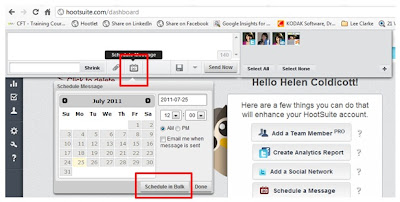
3. Select the ‘Schedule’ button, followed by the ‘Schedule in Bulk’ button as above…

4. This will open a new window, ‘Bulk Schedule Updates’. Select ‘Download Sample.csv and open this in Excel. You'll see three columns, Column A is for the date and time (follow their format), Column B is for your update/tweet and Column C is for your URL.
You can schedule up to 200 messages at a time but you can’t schedule the same message twice.
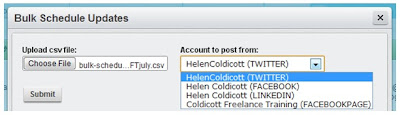
Once you’ve written your updates, save the CSV file and then you are ready to upload them to Hootsuite. Simply choose your file and then choose which account the updates are for.
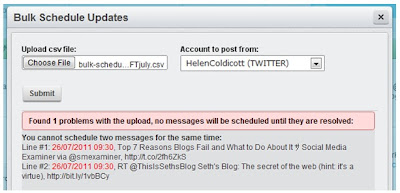
If you make a mistake – Hootsuite will let you know and
not upload your updates until you have corrected the problem in the excel spread-sheet, saved it and then choose it again.

For example, the problem with this upload is that 2 tweets have been scheduled for the same time…
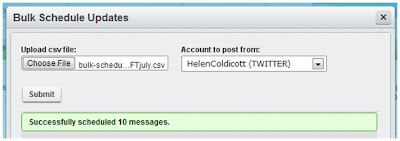
When you have uploaded your updates successfully Hootsuite will let you know, see left…


Here's a run through of the Hootsuite rules for Scheduling Updates in Bulk:
• - Format: DD/MM/YYYY HH:MM,"MESSAGE","URL"
• - All dates/times are relative to currently selected time zone
• - URLs must contain "http://"

Example message: 16/11/2010 17:35,"Your message here","http://website.com"

• - Schedule messages at least 10 minutes from upload time
• - Assign times in 5 minute increments
• - Only one messages per time slot
• - Duplicate messages are not allowed

If you are interested in learning more about social media marketing and would like to attend a workshop, have one to one training or discuss other options please call Helen on 01905 23902.

Wednesday, 13 July 2011

How do I build my social media strategy?

In short like you would build any other marketing strategy.

1. Why am I doing this in the first place?
First you need to establish what it is that you want. Would you like more leads into your website, to expand your audience on Twitter or Facebook, build a network of local business prospects or publicise an upcoming event?

2. Who are my target audience?
Once you’ve clarified what it is that you’re trying to achieve, the next question is who is my target audience and where do they hang out? So if you are a local arts and crafts company looking for direct customers and some local resellers, you need to decide what type of social media they use. Probably Facebook and Twitter will be most popular for the consumers and to target specific resellers, LinkedIn and local business retail groups.

If you are a company who only deals with large construction firms and project management companies, you need to think what type of social media might they use and where do they hang out. Mostly LinkedIn also easy to target specific companies and individuals and maybe Twitter.

3. What resources do I have?
Once you’ve decided what it is you want and who you wish to target, you might ask yourself how much time and money do I have to spend. If you have a limited budget you might decide to only use free social media sites that you can manage internally. If you have a little more money you might want to decide whether it would be best to get some help and outsource some of the responsibility. Set yourself a time limit so that you can measure the effect of your campaign.

4. What’s my plan?
Planning is vital. It is all too easy to start using social media tools without a proper plan or strategy and then wonder where your time went and why you have very little to show for all your effort. If you create a schedule, delegate some of the time it takes to the people best suited to using the different social media tools available.

5. How do I know whether it’s been a success?
Once you’ve reached your deadline – whether this is a month or six weeks, you need to think – how many web leads did I used to receive into my website? How many leads do I receive now? Or have the number of phone enquiries improved? Do I have more facebook Likes? Etc. Where do I rank in Google? Has this improved?

6. Test and repeat.
Once you have carried out your initial social media marketing experiment, see what worked well, what didn’t work – change it and repeat. Getting your Social Media Marketing right for your company is a learning curve, but you have to start somewhere to see if it could work for you. With many things, it’s a case of seeing what works best and persisting with these.

Social Media is not a mystical, science where just a few experts hold all the answers. Social Media owes a lot of it’s success to how free, easy and generally accessible it is.

Thanks to Paul Brindley http://twitter.com/midsinsolvency who recommended this Blog Topic at our Professional Panel meeting on Monday, I hope it answers your question Paul?

To everyone else if you’re still not sure – please give me a call on 01905 23902, I’ll be happy to point you in the right direction.

Wednesday, 15 June 2011

Connecting With Journalists on Twitter


Introducing our first guest blogger Belinda Bull, owner of the increasingly successful Net2Nana online gift shop for mums, grandmas or any lady who deserves a fabulous treat.

Just 12 months ago Belinda started using Twitter and one of her main objectives was she wanted magazine articles about her new online business published in a selection of relevant, targeted publications.

12 months on she reflects on what worked well and shares these tops tips with you.


The recently published 4th Annual Digital Journalism Study showed that 47% of journalists used Twitter “as a source”. With this information to hand we really can’t afford not to build relationships with journalists and let them help us promote our businesses.

So here are my top 10 tips to make sure you are using Twitter to it’s full advantage.
  1. Make sure your Twitter profile reflects what you want your business to be known for and what your area of expertise is.
  2. Raise your Twitter profile, become known as an expert in your field and make it easy for journalists to find you as well as you finding them.
  3. It’s never too soon to start building relationships with journalists on Twitter, plenty of companies start tweeting weeks before they even officially launch. Even once you have a built up a rapport with a journalist they can be working several months ahead so the time to start working on having your product/company featured in a publication may be up to 12 months in advance.
  4. Use and love hashtags – #journorequest, #mediarequest etc. but add one to any tweet that you want journalists searching for info on a particular subject to find.
  5. Be prepared to do some unpaid, uncredited work for a journalist before they run a great feature on you! I supplied one writer with a couple of quotes before she pitched my story to an editor, my reward was a fab 500 word article about my company complete with photos and links to my website.
  6. Follow all the journalists connected to your field, chat, tweet, retweet and communicate with them. Don’t be too upset if some don’t follow you back.
  7. Everyone loves to be flattered so if they make any relevant tweets about your industry acknowledge this by retweeting (RT) them.
  8. If you write a piece on a blog make sure you put a link to it on Twitter, it’s a great way to expose your writing to a wider audience and raise your profile as an expert.
  9. Similarly, if you write a press release provide a link and tag it with #journorequest, ask journalists if they’d like you to email them a copy. This is so much better than sending unsolicited press releases.
  10. Don’t forget it’s a two way deal, the journalists want plenty of new, lively, interesting, informative copy to fill their publications and you want publicity for your company!
I also feel I should mention media strategist Michelle Drapeau, Twitter name @Lexi_Pop, a lovely lady who’ve I’ve got to know through Twitter, her blog www.lexipop.co.uk provides free information to help businesses gain publicity in the press The Writing Shop.

Enjoy connecting on Twitter and you’ll be surprised what you can achieve with 140 characters! I’d love to know about your experiences too.

Belinda Bull - Net2Nana

Look out for Net2Nana in next months Best magazine July 2011 & Essentials August 2011.

Friday, 3 June 2011

How to Use Social Media More Effectively...

"How to use Social Media more Effectively", this is the title for the Workshop I'm delivering next week with Rather Inventive a rather clever, company who help local businesses to use the internet more effectively.

Here I'll summarise the main topics to be covered.

1. Why use Social Media in the first place?
Generally, the people I meet seem to agree that they need to implement Social Media but are still uncertain as to why. Those that still require convincing often it's because Social Media is less relevant to their audience and the type of industry that they're in or they're reluctant to change from what they already know.

The other day a colleague of mine brought this Wine Blog http://www.underwoodwines.blogspot.com/ to my attention. The owner discusses how many sales he receives as a result of Social Media Marketing in his article titled, "The Social Grapevine". What I found most interesting was this question he came across when completing a Social Media Questionnaire for a child's school project.

"Would you (on a scale of 1-10) say you were more likely or less likely to do business or buy a product from a company or person you have engaged with on social media?

Without hesitation I ticked 10 and then realised what had happened. Social media had become so powerful that I would put any company I had engaged with above those I had not. Not as stupid as it sounds though, social media lets you meet the human behind the brand, get to know the personality before you walk in the door. Lets face it, at the end of the day people do business with people. Its a phrase used a lot by a company I have engaged with and met up with through twitter, Local Faces, and they are right. Social media is just that, people talking to other people."

Valid point? I think so. So at the start of the workshop we'll be thinking about "What are the reasons for getting involved with Social Media?".

Dilemma - Engaging your Audience
When I got asked to do this presentation, The initial problem is pitching the content at the right level to meet the audiences expectations and level of knowledge. I hope to achieve a good balance of explaining the "Bigger Picture" where Social Media is concerned and have enough detail for the more advanced users to pick up some tips as well.

This can also be a problem with Social Media. The first thing you need to understand is who your target audience are and what they are interested in before you start to write your blog article.

We hope to run some exercises that help you examine this in more detail for your own business. You can then take these back and implement them later.

Social Media Benefits:
I hope that soon people will not only understand what the benefits of Social Media are but see them working for their own business. So we'll also be discussing why use Social Media in the first place. For me there are two main reasons firstly because the older, more traditional ways of marketing are simply having less affect than they used to and secondly I see a better conversion for people that have actively sought my services - rather than me approaching them. Thirdly, because I have limited staff resources and therefore see Social Media a better investment of my time, fourthly... well you'll have to attend the workshop to here the other benefits!

Top Tips
Top Tips for improving how you use some of the most popular UK Social Media platforms concentrating on: Blogs, Twitter and LinkedIn. I don't profess to know everything about social media, although hopefully more than some. We will share our top tips for social media and find out what works best.

Any other business - All our workshops aim to be interactive, informative and fun and we hope that you all manage to learn some new skills to implement back at the office.

So if you have any questions you'd like answered, just let me know.

To attend any or all of the series of 6 action based marketing workshops please visit...

Monday, 23 May 2011

5 Top Tips to help B2B’s on Facebook

Over the past six months, I have seen more B2B businesses start using Facebook as part of their marketing. The ever increasing popularity of Facebook, has been enough for some business owners to say, what have we got to lose by adding Facebook as another ingredient to our marketing mix.

If you are a B2B business, ultimately the people who buy from you are still people and the whole emphasis of Facebook is engaging and communicating with people.

Here are 5 Top Tips to help you get more from your Facebook Page:

  1. Engage with your customers
To increase your ranking in the Facebook search, the most important factor is the amount of two way interaction (number of Likes, Comments and Shares) that people add to your page.


There are a couple of ways of doing this effectively.
Ask questions that will get a reaction from your audience.
Ask open ended queestions that enable people to comment easily.
Add statement that people can easily ‘Like’.
Add stuff that funny or informative, that people might like to share.

2. Maximise the size of your profile picture

Many people are unaware that the size of your Business Page Profile Picture can be up to 180 x 540 pixcels. This allows you to not just add your company logo, but also add a summary of what your company does or your USP’s. You can even add your telephone number and a call to action, perhaps visit our website for more information...

3. Add Profile Photo’s.

At the top of your Wall you can have up to 5 different photo’s. Make sure to add photo’s that demonstrate your expertise, your products and your customers. You are selling to people, so it’s good for your potential customers to see other customers being happy, satisfied and liking your product or services.

4. Maximise your Online Presence

Facebook has the facility for you to add lots of applications and additional tabs along the lefthand side, use them. You can add your company Blog, you can create bespoke web pages, you can add your twitter account, you can add customer surveys, there are discussion boards, you can even run incentives like Competitions…

5. Run Competitions and Promotions

We all have to start our Facebook Business Page with no ‘Likes’ to start with and we all want to grow our Facebook fan base, so we know we’re not just updating our pages for our own benefit, we want to be communicating with our clients and prospects. The quickest, easiest way to get a good following is to run a competition. If this is something you’re interested in doing make sure you do this using an app and not directly from your wall, it’s against Facebook Policy and could result in your account being closed down.

A couple of Apps you can use for FaceBook Competitions

http://northsocial.com/apps/sweepstakes/

http://northsocial.com/apps/fan-offer/

The Facebook Policy on running Competitions and Promotions

http://www.facebook.com/promotions_guidelines.php

If you have any top tips or examples of great Facebook Business pages, we would love to hear from you.

Many Thanks Helen

Wednesday, 18 May 2011

Top 10 New Blog Ideas...

Use alternative story forms (ASFs) - what are ASFs?
Alternative story forms (ASFs) are content formats other than traditional long-form narratives you might typically use in your newsletter.

Show me some examples of ASFs
  1. Top 10 lists like this one!
  2. 'How to’ features.
  3. Case Studies
  4. Bulleted Lists
  5. Videos & Podcasts
  6. Checklists
  7. ‘Did you know’ facts/hints
  8. Interviews
  9. Charts/Graphs & Surveys
  10. Photo journals
Why do readers like ASFs?
Readers like ASFs as they offer quick, interesting, bite-size ways of absorbing your content that can offer instant gratification to the reader. They don’t have to be used exclusively in your newsletter and can make a wonderful accompaniment to the more traditional story forms used. They can be used to:
  • Show your clients things (watch, listen)
  • Explain things
  • Make comparisons
  • Present information in unique ways
  • And best of all, they're easy to share online!
Do ASFs actually work to increase engagement?
Well yes, according to Poynter Institute’s EyeTrack project ASFs not only generate more interest than regular story forms, but they help readers to retain more information.

If you have any other top tips you would like to share - we'd love to hear from you...

Sunday, 8 May 2011

How strong is your current profile picture?


There’s nothing worse than being on the receiving end of a soft handshake.


You know what we’re talking about, the clammy dead fish introduction where someone places their limp hand in yours and you feel like your holding a lump of jelly.

Not good. Unpleasant. Creepy. Memorable for all the wrong reasons.


Make sure you maximize the grip strength of your Facebook page by taking full advantage of the often-overlooked profile pic.


The competition for mindshare on Facebook has become increasingly steep, and all it takes is one botched first impression to stunt any shot you have at making a quality fan interaction.


The odds are that you're under-utilising your available image real estate (yes, the profile pic accepts images up to 180w x 540h).


That's plenty of space to promote a weekly special, highlight a “Customer Of The Month”, or just lead eyeballs and clicks to one of your custom tabs.


So don't forget to take full advantage of the profile pic, it's a great way to add some strength to your Facebook page without doing any hand exercises.


Need some inspiration?


Why not search for some of your favourite shops and brands online to see what they are doing, or take a look at the links below and let me know what you think...


http://www.facebook.com/gap

http://www.facebook.com/ColdicottTraining

http://www.facebook.com/burgerking

http://www.facebook.com/Sexandthecity


http://www.facebook.com/pizzaexpress

Profile Picture - instantly recognisable plus great competitions...